Features

Everything both apps do

Grouped by what you are trying to get done — booking a treatment on one side, being found and booked on the other. Every item here is built and shipping today; there is no roadmap mixed in.

Customer app

For the person booking

Discover

Finding a spa worth going to

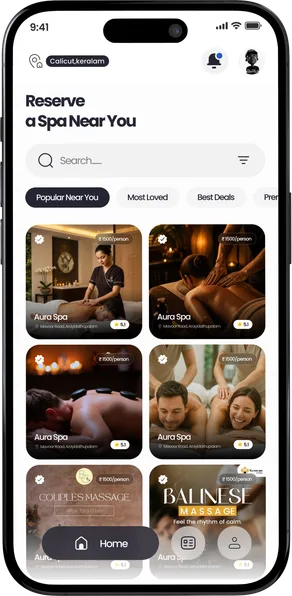
The customer app opens on spas near you and gives you the four ways of narrowing them down that people actually use.

Spas near you, then wider

With location on, the app searches your immediate area first and widens out — district, then state, then country — only as far as it needs to fill the page. Only spas that have passed verification are ever listed, at any tier.
Four ways to sort

Popular Near You, Most Loved, Best Deals and Premium — rating and price, framed the way people actually choose.

Search and filter

Search by name, or open the filter sheet to narrow the list down before you start looking through photos.

The full spa profile

Photo gallery, an about section, amenities, the service menu with prices and durations, current offers, reviews, and the trading hours behind the Open / Closed badge.

Map, street view, directions

See where a spa actually is — a map preview and street view on the profile, and one tap to hand the address to your maps app.

Reviews from real visits

Ratings and written reviews sit on the profile, and are only ever asked for after a session the shop has marked complete.

The home screen: sort chips over a grid of nearby verified spas.

Sorted the way people choose

The four chips across the top of the home screen are the real decision people are making: what is close, what is loved, what is cheap, what is the good stuff. Each one re-sorts the same verified list rather than opening a different one.

Booking

A seat that is really yours

Choosing a time reserves the seat while you review the booking, and the shop answers before anything is treated as confirmed.

Pick the service, then the slot

Choose a treatment, scroll the date strip, and take a time from the grid — each slot showing whether it is free, already taken, or on hold with someone else.

A six-minute seat hold

Picking a time reserves that seat while you check the details, so nobody can take it out from under you mid-booking. The hold lapses on its own if the booking is not confirmed, and the seat goes straight back into the grid.

The shop answers

Confirming sends a request, not a fait accompli. The spa accepts or declines it, and a banner on your home screen tracks the wait while it is live.

Closed spas say so before you start

A spa that only takes bookings during opening hours tells you that up front and disables the button, instead of letting you send a request nobody is there to answer. A spa that would rather not turn business away can instead confirm closed-hours bookings on the spot — the app says which, so you always know whether you are waiting on an answer.

The price, itemised

Service fee, any discount and the total — in rupees, on the booking, before you confirm and again afterwards.

After booking

Everything after the tap

Status, changes, reminders, and the chance to say how it went — all in one list.

Every booking, one list

Requested, confirmed, in session, completed and cancelled — filterable and searchable, with a cancellation always saying who called it off.

Cancel or move a booking

Change your mind and the seat is released; reschedule and the new slot is held before the old one is given up.

Notifications you control

Push updates when a shop answers, plus separate switches for booking reminders and promotional messages — promotional is off unless you ask for it.

Rate the visit

After a completed session the app asks once how it went. Skip it, or turn it off for good.

Report a spa

Seven reasons, a description, a contact number and an optional photo. Reporting a shop also stops it appearing on your home screen.

Delete your account in the app

Profile → Delete Account, with the consequences spelled out before you confirm. No email required, no waiting on support.

A booking always says where it stands

Five states, each with its own colour, and the same five on both sides — so you and the spa are always looking at the same thing. A cancellation also records who called it off.

  • Requested With the shop, seat held
  • Confirmed The spa accepted it
  • In session You have been admitted
  • Completed Session finished
  • Cancelled By you, or by the spa
Partner app

For the spa being found and booked

Being found

Guests find you, not just your sign

A verified listing puts your treatments, your prices and your photos in front of the people already looking for a spa near them.

In front of the people nearest you

Guests open the app looking for a spa near them, not for a name they already know. Being listed puts you in front of somebody who is ten minutes away and choosing right now.

Verified, and guests can see it

Every spa is checked before it is listed, so a guest browsing is choosing between businesses that all came through the same door. Nothing unverified is ever shown to them. Your paperwork is never shown to a guest — only the fact that you passed.

A listing that answers the questions

Photos, a description, your amenities, and every treatment you offer with what it costs and how long it takes — the things a guest would otherwise have to ring up and ask.

Reviews from people who actually came

A rating can only be left after a session that really happened, so the reputation attached to your listing is one you earned rather than one anybody could type.

Keep it current yourself

Prices move, treatments come and go, and photos need refreshing. Your listing is yours to update — nobody has to be rung up to change it for you.

Being booked

More bookings, less phone

Guests book the times you have made available, whenever they happen to be deciding — and you keep the day and the money on your own terms.

Bookings while you work

A guest chooses a treatment and a time on their own, at eleven at night if that is when they are deciding. The booking does not have to wait for somebody to be free to pick up.

Only ever what you can take

The days you open, the hours you take bookings in, how many guests you can have at once, the days you close — you set all of it, and a guest can only book inside it.

Closed hours stop leaking business

Most people browse in the evening, long after a spa has shut. You choose in advance what should happen to a booking made then, so a quiet Sunday night is not a lost one.

The month, already added up

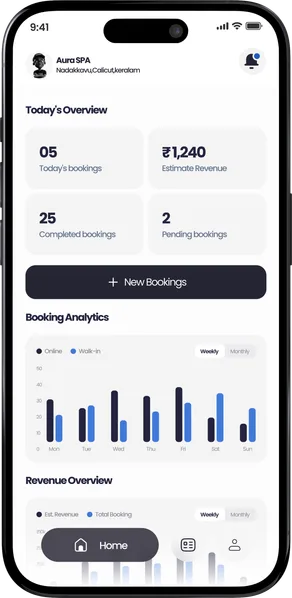
What today brought in, and how this week and this month compare — there when you want it rather than after an evening with a calculator.

Payment stays between you and the guest

Nothing is charged through either app, and no card is taken. A booking brings the guest to your door; what happens at the till afterwards is yours.

The partner dashboard with today's figures and a weekly chart.

The figures a shop actually asks about

What today brought in, and how this week and this month compare — the two or three numbers an owner would otherwise spend an evening working out from a diary, ready before they think to ask for them.

Your figures are yours. Nothing about your takings is ever shown to a guest.

Ready when you are

Book a verified spa near you in a few taps — or list your own spa and be found by the guests already looking nearby.

Link pending Google Play Link pending App Store